-->

Friday, November 30, 2012

Pass the Word for VetNet

A quick Public Service Announcement.  I saw this over on Engadget and with one son just out of the Navy, one with 15 months left in the Marines and a nephew back from Afghanistan and getting discharged before Christmas, I'd like pass the word about VetNet.


I remember my transition fifteen years ago and it would have been nice to have had something like this available then.  I also know that there are a lot of gamers who have served, so be a good shipmate and help pass the word.

I realize this is a US centric service Google is providing and having had the pleasure of serving with many of our allies (including a memorable afternoon drinking aboard HMCS Terra Nova off of Haiti), if you are aware of support efforts for veterans in other countries, let me know and I'll help you pass the word for them.

Thursday, November 29, 2012

Building Campaign Maps with Google and GIMP 3

Ridiculously easy

In the previous post, I had finished editing out all of the roads and labels leftover from the screenshot I had taken in Google Maps.  I want a hex map, I came up when players still bounced routinely between RPGs and Avalon Hill or Strategy and Tactics' board games, all of which were overlayed with a hex grid. I 've tried generating hex grids on computers for thirty years with varying results.  Here I go again.

Start by saving the map as a GIMP *.xcf, that way even if you screw up down the line, there's a back up of all that work you put in to clean up the terrain.  With the xcf file, I'm going to add layers, that way if I put a town in the wrong place, I won't have to re-edit the terrain.  To do that, press Control-L to bring up the Layer dialog. 


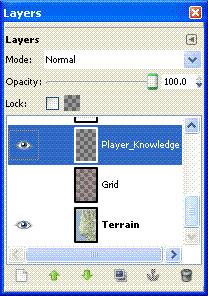
I've gone into the Layer Properties and renamed the first layer as 'Terrain', and created two additional layers 'Grid' and 'Player_Knowledge'.  I'll use the latter to control what shows up on any maps I provide to the players.  The little eye icons, control visibility of the layer, 'Grid' is currently invisible.  The highlighted layer indicates which one you are currently editing.

As expected the page icon in the lower left is used to create a new layer.


So, how about that grid. I did a quick Google search in the expectation that someone, somewhere had not only wanted to use GIMP to make a hex grid, but had published direction on how to do it.  What I found was a GIMP 'Script-fu' to do it for me - Hex Grid. Follow the instructions to install the script, then select your Grid layer and Filters->Render->Pattern->Hex Grid.
Change the color to red, reduce the Line Width to 1 pixel and throw in a horizontal offset of half a pixel to avoid edge effects.  A little playing around counting hexes demonstrated that a Side length of 9 pixels gives a scale of approximately one mile center to center on the hexes. I'm not going to worry about the exact scale, (a) I'm limited by technology, I can't make it draw fractions of a pixel, (b) in the Classical world they couldn't agree on the length of measurement either, and (c) it's a play aid, close enough works.

Here's the map from Apollonia to Oricum at 1:1 scale.  I'm also showing the Player_Knowledge layer with the cities and major roads.  Oddly, to me anyway, each name is treated as a separate 'mini-layer' by GIMP, so looking in the Layer dialogue you will also see Layers for 'Apollonia' and 'Oricum'.


As I said at the beginning it's ridiculously easy to add a hex grid in GIMP for tracking overland travel.  In a subsequent post I'll cover how I sited the cities, and start generating smaller communities on a 'Small_Town' layer.

Wednesday, November 28, 2012

20 Questions

My answers to Jeff Rients 20 Questions. Campaign map at the bottom.

  1. What is the deal with my cleric's religion?
    It's all politics at the top. Powerful individuals get elected to the position of high priest for the social status it brings them. They can do a few divinations, but don't ask them to raise the fighter from the dead. The heavy lifting is done by under priests, who often retired/crippled adventurers such as your character. The good news is that if you can help the high priest, he'll help you. Whether it's straightening out that little mix up that burned the tavern down or knowing where to get that rare Egyptian unguent needed for the potion, the high priest has the connections to help.

  2. Where can we go to buy standard equipment? 
    Lissus, Epidamnus, Apollonia can supply you with most of what you want. In particular, Apollonia and Epidamnus are major trading ports on the route to and from Italy and the East. Goods are periodically available in those locations that are usually only available in larger cities. Lychnidus, Oricum and Onchesmus have most standard goods for sale, rarely a single masterwork item. Smaller villages will only have provisions and mundane items.

  3. Where can we go to get platemail custom fitted for this monster I just befriended? 
    Sucks to be you. Platemail hasn't been invented yet, nor has half plate. The best you will do is Banded. I'd start with the armorers at the Cohort IXof Legion I Macedonicus in Lissus

  4. Who is the mightiest wizard in the land? 
    Pantarious, as the Egyptian Pan-Twa-Re's name has been latinized. A recent arrival with the new Legate G. Servilius Vatia in Apollonia.

  5. Who is the greatest warrior in the land? 
    Lucius Pulcio, retired Roman soldier now serving as Captain of the Guard for Perseus Tuetella, Dynast of Epidamnus. Pulcio single handedly killed an elephant charging his cohort at the battle of Zama, receiving a Civic Crown for his achievement.

  6. Who is the richest person in the land?
    The Legate G. Servilius Vatia is only here temporarily, so Perseus Tuetella, Dynast of Epidamnus is the richest local.

  7. Where can we go to get some magical healing? 
    Apollonia is your best bet, the Temple of Apollo has an attached shrine to his son Asclepius. Also, you can try the Stoa of Apollonia, a group of mages and sages who are willing to try anything to cure someone else.

  8. Where can we go to get cures for the following conditions: poison, disease, curse, level drain, lycanthropy, polymorph, alignment change, death, undeath? 
    The Stoa of Apollonia

  9. Is there a magic guild my MU belongs to or that I can join in order to get more spells? 
    No guild, but you can buy temporary library rights from the tutors at the Stoa.

  10. Where can I find an alchemist, sage or other expert NPC? 
    The Stoa of Apollonia for intellectuals.  Lissus, Epidamnus and Apollonia for skilled craftsmen.

  11. Where can I hire mercenaries? 
    Lissus, Epidamnus and Apollonia have ruffians for hire. Not really trained mercenaries, but sailors who like to fight.

  12. Is there any place on the map where swords are illegal, magic is outlawed or any other notable hassles from Johnny Law? 
    Illegal, no. But anything bigger than a shortsword and leather armor gets you marked as a barbarian within the towns. In other words, prices go up and reactions go down (-2).

  13. Which way to the nearest tavern? 
    The upper class entertain each other in their own houses. So all you'll find are neighborhood bars, where prices will go up and reactions down (-2) to strangers, or dives down by the waterfront. 

  14. What monsters are terrorizing the countryside sufficiently that if I kill them I will become famous? 
    Nothing near the cities, and anything done up in the mountains will be discounted as occurring in out in the sticks.  You might want to hire someone to write an epic poem about your feat, if fame is that important to you.

  15. Are there any wars brewing I could go fight? 
    Legion I Macedonicus Cohort IX in Lissus is hiring. It's a twenty five year hitch, roll up a new character. Tribal raids from the Illyrians are an occasional annoyance, but haven't gotten past the fortress at Lissus in over twenty years.

  16. How about gladiatorial arenas complete with hard-won glory and fabulous cash prizes? 
    Epidamnus. Minimum ten fights, hard to win - yes,  for glory and cash go to Rome.

  17. Are there any secret societies with sinister agendas I could join and/or fight? 
    Not so much secret societies, but people with agendas include Perseus Tuetella, Dynast of Epidamnus, who would like to kick the Romans out and set up the Illyrian kingdom again.  Also, the magician Pantarious is known to have his own agenda, but rumor doesn't agree on what it is.

  18. What is there to eat around here?
    Fish, Goat, Olives, Fruit, Grains.  Wine in the low lands, beer is more common in the mountains.

  19. Any legendary lost treasures I could be looking for? 
    Jason's Shield, that he used to defeat Medusa, is said to be hidden in the mountains.  It is said to be the first object made out of Bright-Steel by the Miraditorum dwarves.

  20. Where is the nearest dragon or other monster with Type H treasure?
    A large bronze dragon has been seen along the coast south of Oricum.
Here's the map with the cities shown.  How I went from the terrain to adding in cities and major roads is a subject for another post.


Building Campaign Maps with Google and GIMP 2

Removing labels, roads and borders

In my last post I had taken an image from Google maps and trimmed off the unwanted borders.  Now for a few techniques in taking the map down to just the terrain.


Here I've taken the previous image and zoomed to a 4:1 scale (400% actual size).  I've found this is the largest scale where I can still recognize the terrain while I'm editing. I'm going to remove the label "Kolonje" in this example, it will demonstrate the technique I use to rebuild land forms that were covered by labels.

Use the eyedropper tool (1) to select the lightest color from the surrounding terrain.  The use the paint brush tool (02), set on a convenient shape, such as "Circle (05)" (3) to paint over the lablel (4).


`
The next step is to use the spray gun tool to rebuild terrain features.  This time select the darkest portion of the feature being rebuilt with the eyedropper and set the spray gun tool to "Fuzzy Circle (03)", this allows the paint to fade out at  the edges.  Draw in the lines you want and then darken the intervening spaces to match the surrounding terrain.


 The last step is to use the eyedropper to select the color of the surrounding terrain and paint over the rest of the label and any roads or other symbols in the area.


Repeat for all the other labels until your map is clean.  It will take several hours, but in the end you'll end up with a map like this.  (In this map, I've stitched together the areas above and below the initial map to build a map of the campaign area).


Tuesday, November 27, 2012

My Gaming Shelf

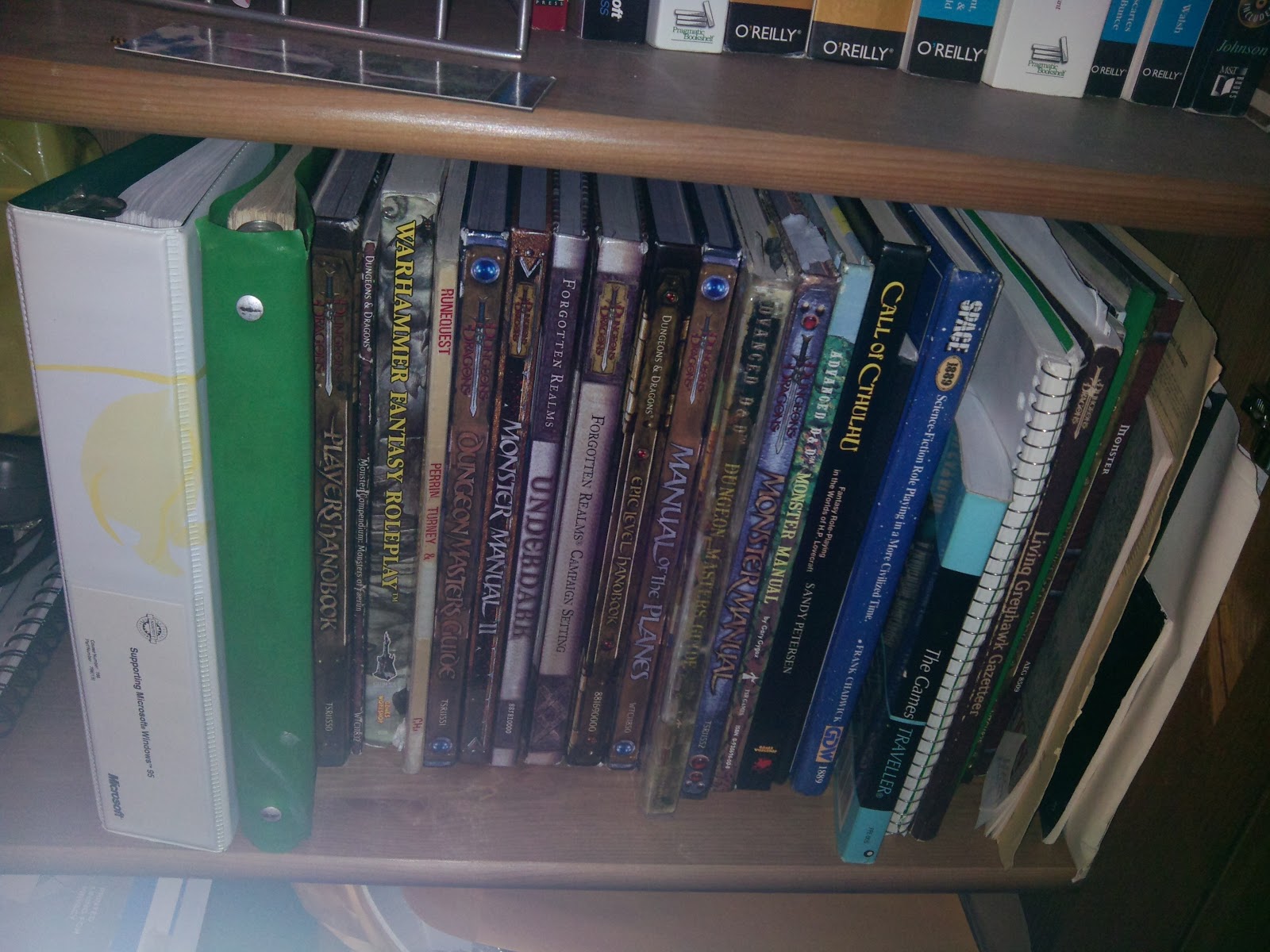
James over at Grognardia has posted a picture of the gaming references he keeps on hand.  So here's my shelf.
The thick white binder I got at one of the very first 'Supporting Microsoft Windows 95" courses (I attended with the instructors), it contains a copy of the German RPG The Dark Eye (English language version)The Green binder next to it is my battered copy of Chivalry and Sorcery, the red cover edition.  It fell apart back in the early 80's so I transferred it into a binder using a three hole punch on the pages.  What you don't see are the PDF's I've collect on my tablet, Pathfinder and RuneQuest supplements such as Pavis and the Big Rubble, Griffin Mountain, Cult Compendium and Border Lands and Beyond.  Bless you, driveThruRPG!  Somewhere in the basement are my first edition ShadowRun and Traveller books

Building Campaign Maps with Google and Gimp

My campaign has been in hiatus for a few months now while I've been playing Alesmiter; so my batteries are recharged and I'm ready to start planning the next round of adventures.  One of the decisions I've made is to move the campaign location from North Africa to Eprius Nova, the area which we now call Albania.  It gives me adventuring areas closer to an urban center.  Time to make a new map.

I'm using a new technique to make the maps, snapshots of Google maps areas, cleaned up and stitched together using GIMP.  I'm not a GIMP expert by any means, but I've been able to figure out how to do things with it fairly easily.  I'm running a campaign set in a fantasy Roman Republic, just after the fall of Carthage and about 90 years before Gaius Julius Caesar invades Gaul.  So Google Maps can be used to build my campaign world.  Of course, any large scale (small area) fantasy setting could be mapped over piece of the real world terrain using these techniques.

Getting the image - I opened Google Maps to Albania at the 5 mile scale and took a snapshot on my tablet.
I saved the image off onto my laptop and opened it in GIMP.

I used Google Maps - Terrain mode because it gives me an effect I like better than the plain Satellite view or the Earth view.  It does have a limitation in that I can't turn labels off in this view.  So I'll have to deal with them later.  The first thing I'll do is crop the control bars on the top and bottom of the image. 

The cross hairs on the pointer (not shown) identify a point on the image, by hovering over the top of the lower control bar, the pointer location circled in the bottom corner of the screen shows that it's at pixel 752.  Similarly I used the pointer to find the bottom of the top control bar, at pixel 58.  752 -58 gives us an image height of 694.


 Using Image -> Canvas Size from the menu I reach this dialog


Click on the chain icon (1) to decouple the image Width and Height, as we don't need to trim the ends.  Set the desired image height (2).  Set your offset from the top of the image (3) - not sure why the value '58' didn't get captured here.  Select to resize All Layers (4), click Center (5) and then Resize (6).  And you have successfully trimmed your image.


In my next post I'll cover techniques for getting rid of those pesky labels, modern roads and borders from the image.


Sunday, November 25, 2012

Thoughts on Role Playing


It's fun to get together with the group, catch up and roll some dice, but I really enjoy the role playing aspect.  In particular, coming up with the role I'm going to play with this character.

The first piece of developing a role is to establish a backstory.  Different games provide the players with different requirements for the backstory, 1e has a table of professions, 2 and 3.x didn't have anything that I used.  Warhammer Fantasy Role Playing (WFRP) has you generate what the character is doing for  living; Chivalry and Sorcery started with two pages of tables laying out your birth order, standing in society and whether or not you were the Black Sheep of the family.
Now, the backstory does not need to be terribly elaborate, a single hook can be enough to for you to know how to play the character.  In one case I was playing a halfling barbarian armed with a warhammer, I came up with the hook that he had been an enforcer for the Hobbit Thieves Guild (thank you Fineous Fingers).  With that hook and class, I then decided that as a halfling, his specialty would be kneecapping the opposition, which gave me his nickname 'The Kneecapper'.   When the dice rolls showed that the character had noticed the same shadowy figure watching the party as he had seen earlier, the character's response was obvious, the pint sized Conan waked up to her and said, 'I never forget a pair of knees, what are you doing here, doll?' - or words to that effect.   Attacking the watcher, alerting the party, or any other option simply wouldn't have fit  the character's personality.  Later when the party visited a city, everyone else was running around searching for more and more powerful magic items to buy, I gave some thought to his actions.  Conan never upgrades his equipment unless it's been broken or failed him somehow, so no upgrades for the Kneecapper.  Barbarians like shiny things and blow their money on wine, wenches (a term my wife loathes) and gaudy toys.  The look on the DM's face when he asked me what the character was doing and I asked him for a price on having my armor gold plated will warm my memory forever.  Sure, I could have gone out and bought a +3 warhammer and armor of never being hit, but that would have been the player buying it and not the character.  Nor would it have been nearly as enjoyable for everyone.

Most players seem to come up with at least a sketchy backstory, but character goals seem to have disappeared since 1e.  Two of my 1e characters established territories around Lake Whyestil in the original Greyhawk campaign setting.  Since then, I haven't seen a game that addresses how these powerful characters can settle down and fit into their society.  I think of it as the WoW effect, all electronic games are heavily scripted, the more options they present to the player, the more scripts they can execute, but it's an illusion of freedom,  you can never deviate from the actions the developers have allowed.  The action the developers allow is for the player to advance his character to evermore powerful levels.  Now this makes perfect sense in electronic games, particularly MMO's where the developer or at least the host has an economic interest in keeping the player playing.  Breaking this limitation in RPGs adds to the enjoyment for the players.  Whether the character retires to NPC status or is simply referenced in the name of an inn their new characters visit on a later adventure, it adds to the sense that they have helped create the world you're sharing with them.

 And if you want the character to retire after they've earned enough gold to buy that inn, well why not?  A good DM can certainly use that as a springboard to new adventures, anything from catching a persistent burglar to dealing with an infestation of kobolds in the beer cellar.